Wenn man - wie ich - Nomad Cluster auf OpenStack-Umgebungen betreiben will, kann es vorkommen, dass man gern Cinder Volumes als Blockstorage in Nomad Jobs verwenden will.
In Nomad gibt es drei Optionen für "stateful workloads":
- Container Storage Interface (CSI) Plugins
- Nomad Host Volume Support
- Docker Volume Drivers
Für OpenStack Cinder steht ein CSI Plugin zur Verfügung. Natürlich findet man - wenn man nach entsprechender Dokumentation sucht - in erster Linie Informationen darüber, wie man CSI Plugins zusammen mit Kubernetes verwendet.
Wenn man etwas tiefer gräbt entdeckt man, dass es ein Nomad-Pack CSI OpenStack Cinder gibt.
Wenn man sich das Nomad-Pack Binary herunterlädt, die Community-Registry mit nomad-pack registry add default github.com/hashicorp/nomad-pack-community-registry einbindet, dann sollte man z. B. mit nomad-pack plan --parser-v1 csi_openstack_cinder --var="cloud_conf_file=cloud-prod1.conf" --var="job_name=csi" --var-file="./overrides.hcl" --var="region=de-west" nachschauen können, ob der Job grundsätzlich deploybar wäre.
Leider antwortet Nomad darauf mit
! Failed Job Conflict Validation

    Error:   Unexpected response code: 500 (No path to region)
    Context:
        - Template Name: csi_openstack_cinder/templates/csi_openstack_cinder.nomad.tpl
Und das durchaus für verschiedene Werte von region.
Was aber funktioniert ist nomad-pack render --parser-v1 csi_openstack_cinder --var="cloud_conf_file=cloud-prod1.conf" --var="job_name=csi" --var-file="./overrides.hcl" --var="region=de-west" > csi-job.hcl. Mit render kann man sich quasi das im Pack enthaltene Template mit den übergebenen Variablen "ausfüllen" und dann ausgeben lassen.
Das sieht dann so aus:
job "csi" {
  region      = "de-west"
  datacenters = ["prod1"]
  type        = "system"

  group "nodes" {

    restart {
      attempts = 5
      delay    = "15s"
      mode     = "delay"
      interval = "5m"
    }


    constraint {
      attribute = "${attr.platform.aws.placement.availability-zone}"
      value     = "nova"
    }

    task "cinder-node" {
      driver = "docker"
      template {
        data        = <<EOT
[Global]
auth-url="https://prod1.api.pco.get-cloud.io:5000"
domain-name="mydomainname"
tenant-name="mytenantname"
username="myusername"
password="mypassword"
region="prod1"

        EOT
        destination = "secrets/cloud.conf"
        change_mode = "restart"
      }
      config {
        image = "docker.io/k8scloudprovider/cinder-csi-plugin:latest"

        mount {
          type     = "bind"
          target   = "/etc/config/cloud.conf"
          source   = "./secrets/cloud.conf"
          readonly = false
          bind_options {
            propagation = "rshared"
          }
        }
        args = [
          "/bin/cinder-csi-plugin",
          "-v=3",
          "--endpoint=unix:///csi/csi.sock",
          "--cloud-config=/etc/config/cloud.conf",
        ]
        privileged = true
      }

      csi_plugin {
        id        = "csi-cinder"
        type      = "node"
        mount_dir = "/csi"
      }
    }
    task "cinder-controller" {
      driver = "docker"
      template {
        data        = <<EOT
[Global]
auth-url="https://prod1.api.pco.get-cloud.io:5000"
domain-name="mydomainname"
tenant-name="mytenantname"
username="myusername"
password="mypassword"
region="prod1"

        EOT
        destination = "secrets/cloud.conf"
        change_mode = "restart"
      }
      config {
        image = "docker.io/k8scloudprovider/cinder-csi-plugin:latest"
        mount {
          type     = "bind"
          target   = "/etc/config/cloud.conf"
          source   = "./secrets/cloud.conf"
          readonly = false
          bind_options {
            propagation = "rshared"
          }
        }

        args = [
          "/bin/cinder-csi-plugin",
          "-v=3",
          "--endpoint=unix:///csi/csi.sock",
          "--cloud-config=/etc/config/cloud.conf",
        ]
      }

      csi_plugin {
        id        = "csi-cinder"
        type      = "controller"
        mount_dir = "/csi"
      }
    }
  }
}
Damit (ich glaube ich habe den constraint noch 'rausgenommen und node_pool = "static-clients" hinzugefügt) kann man dann die Controller- und die Node-Jobs ausrollen.
Damit sind dann die Voraussetzungen geschaffen, um überhaupt Cinder-Volumes aus Nomad verwenden zu können.
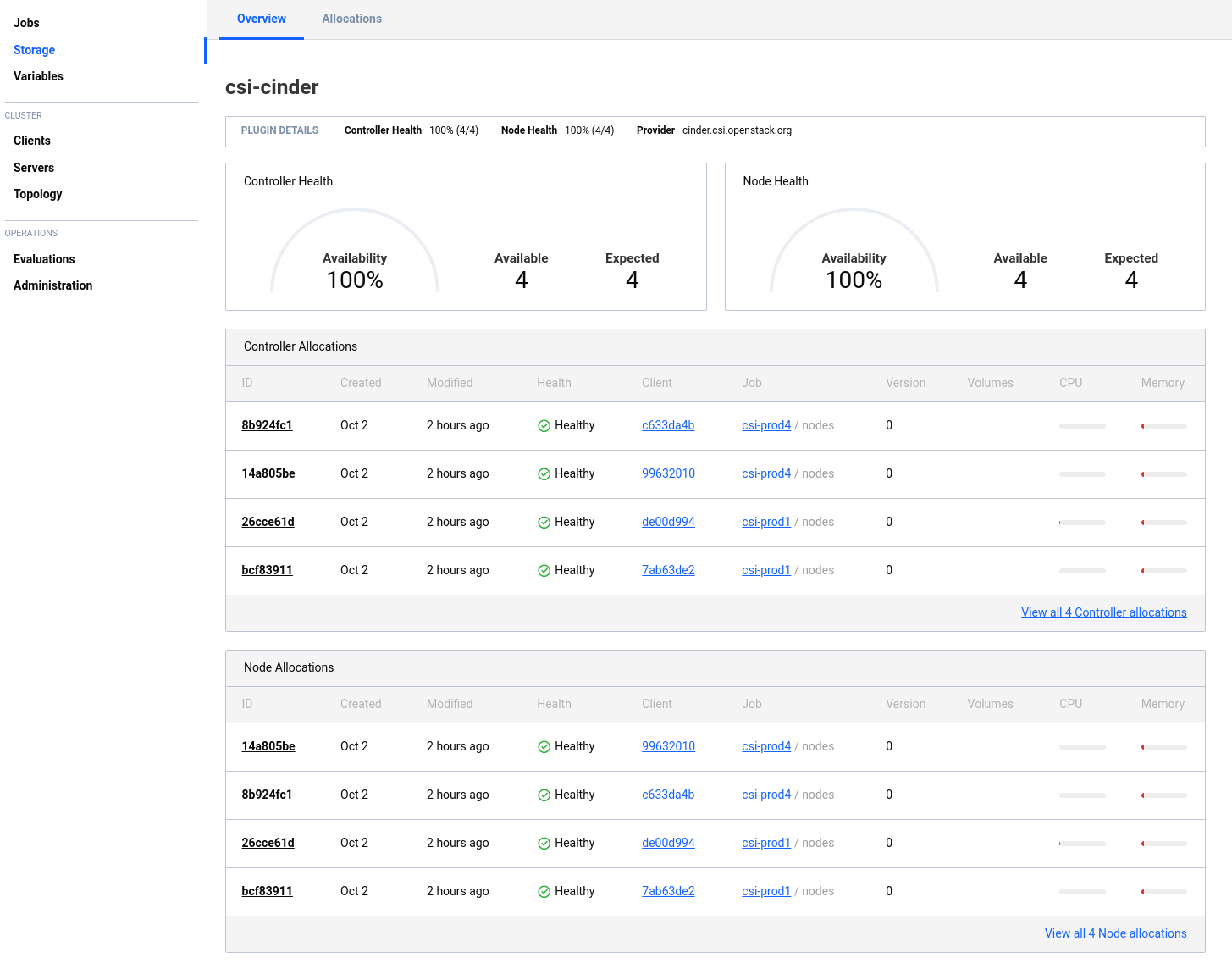
In der Nomad-GUI sieht das dann so aus:
Der Job aus dem Nomad-Pack ist aber nicht (mehr?) ganz richtig. Wie man oben sieht, besteht das Plugin aus zwei Tasks, die man eigentlich auch in zwei verschiedenen Jobs abbilden sollte. Damit der eine (Controller) als "service"-Job laufen kann - und der andere als "system" Job. Wenn man ihn so wie oben startet, werden vermutlich Ressourcen verschwendet. Besser wäre so:
 job "csi-cinder-prod4-controller" {
      region      = "de-west"
      datacenters = ["prod4"]
      type        = "service"
      node_pool   = "all"

      group "controller" {

        restart {
        attempts = 5
        delay    = "15s"
        mode     = "delay"
        interval = "5m"
      }

        task "cinder-controller" {
          driver = "docker"
          template {
            data        = <<EOT
[Global]
auth-url    = {{- with nomadVar "nomad/jobs/csi-cinder-prod4-controller" }} "{{ .osauthurl }}" {{- end }}
domain-name = {{- with nomadVar "nomad/jobs/csi-cinder-prod4-controller" }} "{{ .osdomainname }}" {{- end }}
tenant-name = {{- with nomadVar "nomad/jobs/csi-cinder-prod4-controller" }} "{{ .osprojectname}}" {{- end }}
username    = {{- with nomadVar "nomad/jobs/csi-cinder-prod4-controller" }} "{{ .osusername }}" {{- end }}
password    = {{- with nomadVar "nomad/jobs/csi-cinder-prod4-controller" }} "{{ .ospassword }}" {{- end }}
region      = {{- with nomadVar "nomad/jobs/csi-cinder-prod4-controller" }} "{{ .osregion }}" {{- end }}
        EOT
        destination = "secrets/cloud.conf"
        change_mode = "restart"
          }
          config {
            image = "registry.k8s.io/provider-os/cinder-csi-plugin:v1.36.0"

            mount {
              type     = "bind"
              target   = "/etc/config/cloud.conf"
              source   = "./secrets/cloud.conf"
              readonly = false
              bind_options {
                propagation = "rshared"
              }
            }

            args = [
              "/bin/cinder-csi-plugin",
              "-v=3",
              "--endpoint=unix:///csi/csi.sock",
              "--cloud-config=/etc/config/cloud.conf",
            ]
          }

          csi_plugin {
            id        = "csi-cinder"
            type      = "controller"
            mount_dir = "/csi"
          }
        }
      }
    }
Und so:
job "csi-cinder-prod4-nodes" {
  region      = "de-west"
  datacenters = ["prod4"]
  type        = "system"
  node_pool   = "all"

  group "nodes" {

    restart {
      attempts = 5
      delay    = "15s"
      mode     = "delay"
      interval = "5m"
    }

    task "cinder-node" {
      driver = "docker"
      template {
        data        = <<EOT
[Global]
auth-url    = {{- with nomadVar "nomad/jobs/csi-cinder-prod4-nodes" }} "{{ .osauthurl }}" {{- end }}
domain-name = {{- with nomadVar "nomad/jobs/csi-cinder-prod4-nodes" }} "{{ .osdomainname }}" {{- end }}
tenant-name = {{- with nomadVar "nomad/jobs/csi-cinder-prod4-nodes" }} "{{ .osprojectname}}" {{- end }}
username    = {{- with nomadVar "nomad/jobs/csi-cinder-prod4-nodes" }} "{{ .osusername }}" {{- end }}
password    = {{- with nomadVar "nomad/jobs/csi-cinder-prod4-nodes" }} "{{ .ospassword }}" {{- end }}
region      = {{- with nomadVar "nomad/jobs/csi-cinder-prod4-nodes" }} "{{ .osregion }}" {{- end }}
        EOT
        destination = "secrets/cloud.conf"
        change_mode = "restart"
      }
      config {
        image = "registry.k8s.io/provider-os/cinder-csi-plugin:v1.36.0"

        mount {
          type     = "bind"
          target   = "/etc/config/cloud.conf"
          source   = "./secrets/cloud.conf"
          readonly = false
          bind_options {
            propagation = "rshared"
          }
        }
        args = [
          "/bin/cinder-csi-plugin",
          "-v=3",
          "--endpoint=unix:///csi/csi.sock",
          "--cloud-config=/etc/config/cloud.conf",
        ]
        privileged = true
      }

      csi_plugin {
        id        = "csi-cinder"
        type      = "node"
        mount_dir = "/csi"
      }
    }
  }
}
Dann kann man daran gehen und ein Volume bereitstellen, welches man dann in Nomad Jobs verwenden kann.
Dazu benötigt man eine "Volume Specification" Datei. Eine entsprechende Beispieldatei kann man sich mit nomad volume init erzeugen (die erzeugte Datei heißt volume.hcl).
id           = "cinder_prod1_testvolume"
name         = "testvolume"
type         = "csi"
plugin_id    = "csi-cinder"
capacity_max = "5G"
capacity_min = "5G"

parameters {
  type = "ceph-premium"
}

capability {
  access_mode     = "single-node-reader-only"
  attachment_mode = "file-system"
}

capability {
  access_mode     = "single-node-writer"
  attachment_mode = "file-system"
}

topology_request {
  required {
    topology { segments { "datacenter" = "prod1"} }
  }
}

mount_options {
  fs_type     = "ext4"
  mount_flags = ["noatime"]
}
Mit dieser Datei kann man dann mit nomad volume create cinder-volume-prod1.hcl ein Volume im OpenStack erzeugen.
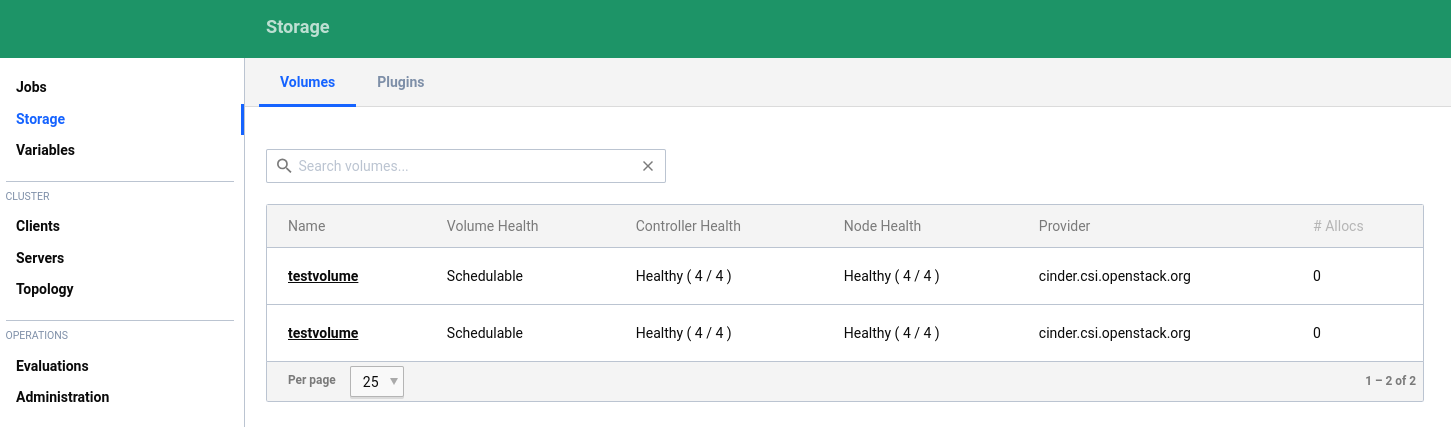
Mir ist es (bisher) nicht gelungen, ein Volume, welches in einem anderen Datacenter existiert zu registrieren. Ich kann also nicht von einem Nomad-Client in prod1 ein Volume registrieren, welches sich in prod4 befindet (obwohl die beiden Nomad-Cluster föderiert sind). In der GUI sieht das dann so aus:
Wenn man Volumes in nicht föderierten Umgebungen benutzt, ist die weitere Verwendung dann relativ einfach. Ein Beispiel mit mysql könnte z. B. so aussehen:
job "mysql-server-prod4" {
  datacenters = ["prod4"]
  type        = "service"
  node_pool   = "static-clients"

  group "mysql-server" {
    count = 1

    volume "mysql" {
      type            = "csi"
      read_only       = false
      source          = "cinder_prod4_testvolume"
      access_mode     = "single-node-writer"
      attachment_mode = "file-system"
    }

    network {
      port "db" {
        static = 3306
      }
    }

    restart {
      attempts = 10
      interval = "5m"
      delay    = "25s"
      mode     = "delay"
    }

    task "mysql-server" {
      driver = "docker"

      volume_mount {
        volume      = "mysql"
        destination = "/srv"
        read_only   = false
      }

      env {
        MYSQL_ROOT_PASSWORD = "password"
      }

      config {
        image = "hashicorp/mysql-portworx-demo:latest"
        args  = ["--datadir", "/srv/mysql"]
        ports = ["db"]
      }

      resources {
        cpu    = 500
        memory = 1024
      }

      service {
        name = "mysql-server"
        port = "db"

        check {
          type     = "tcp"
          interval = "10s"
          timeout  = "2s"
        }
      }
    }
  }
}
Den richtigen Namen für die source findet man übrigens nur über die Ausgabe von nomad volume status heraus:
root@nomad-prod4-0:~# nomad volume status
Container Storage Interface
ID                       Name        Namespace  Plugin ID   Schedulable  Access Mode
cinder_prod1_testvolume  testvolume  default    csi-cinder  true         <none>
cinder_prod4_testvolume  testvolume  default    csi-cinder  true         <none>
Um aber auch in der anderen Umgebung einen MySQL-Job (mit dem anderen Volume) starten zu können, sind offenbar noch andere Parameter erforderlich. Denn für dieses Deployment findet Nomad dann keine passenden Hosts.
Hier muß also noch ein wenig weiter geforscht werden.